Bib2ml



Many researchers make use of BibTeX for maintaining a comprehensive bibliography which they can then draw on at will when writing papers.
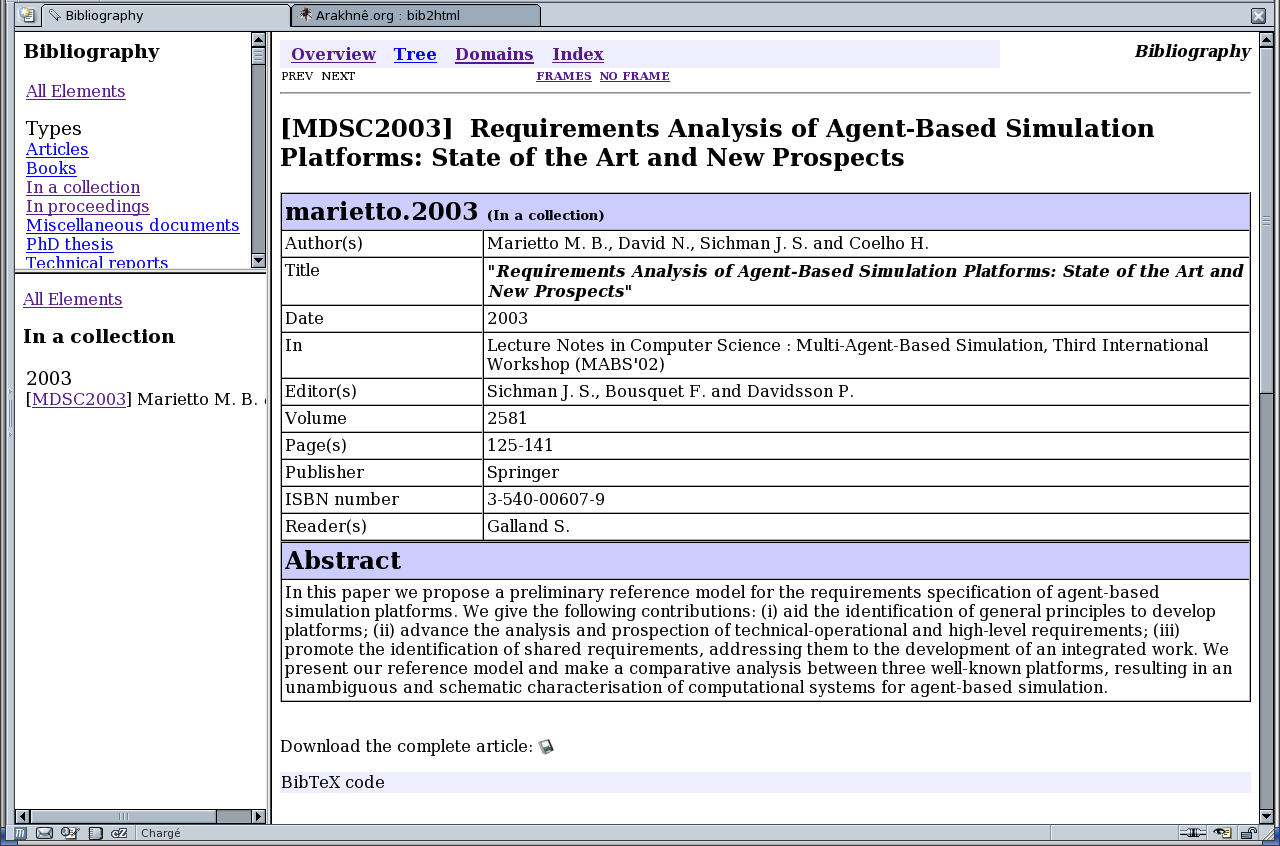
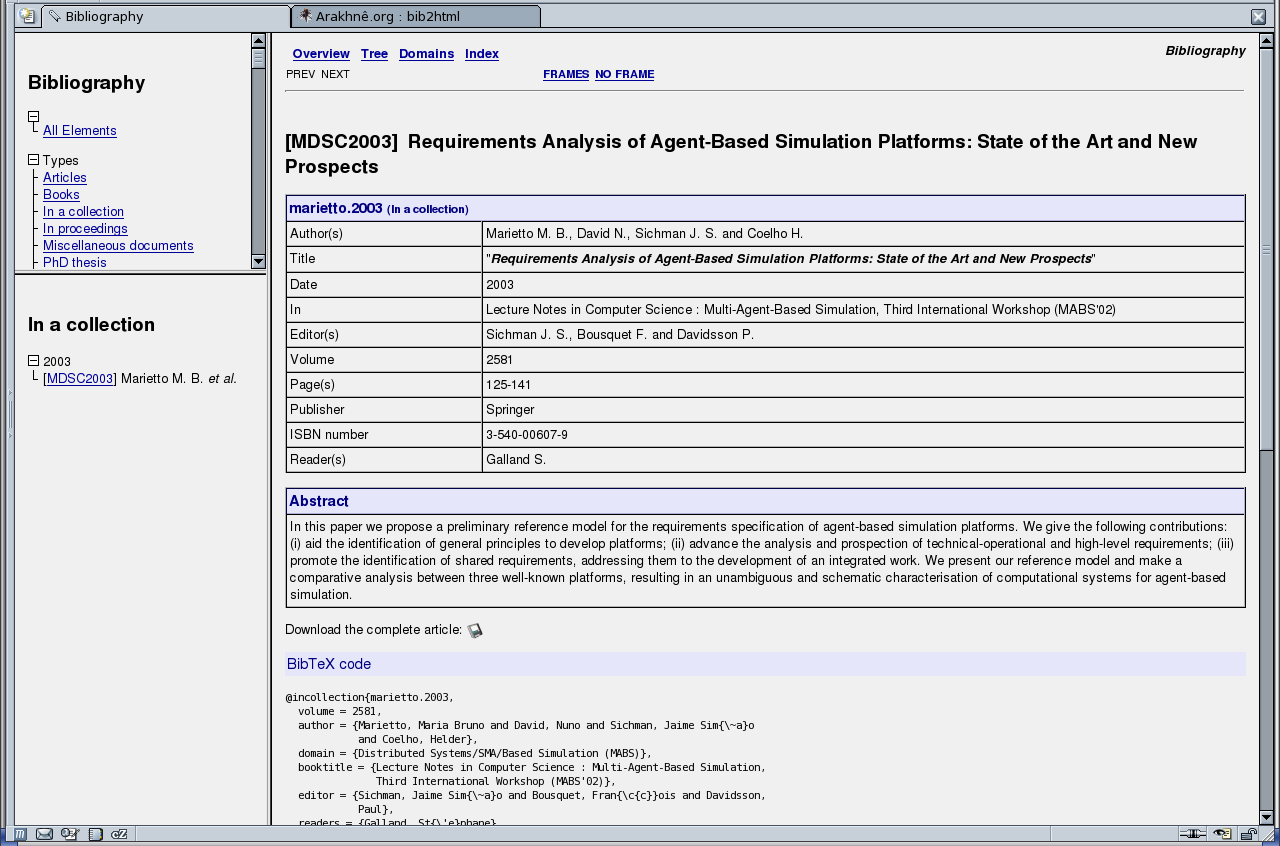
Bib2ML is a handy utility that converts BibTeX files into HTML pages (or XML or SQL). You can use it to easily maintain an updated online bibliography. In addition, it is possible to specify, for each bibfile entry, a set of additional information that will appears inside the generated pages. The output depends of the used theme. But the pages' hierarchy has a similar structure that the JavaDoc's ones (see the two screenshots generated with the theme 'Simple' and the theme 'Dyna'). It includes a overview page, an index, an list of scientifical domains in which the BibTeX's entries are.
1. Demonstration Site
An example of HTML pages generated by bib2ml is available on the demonstration page. These demonstration pages have been generated with the default options ob bib2ml.
2. How to install Bib2ML?
2.1. Prerequires
To run BibHTML you must install a Perl interpreter. Bib2ML was tested with Perl v5.8.3 under Linux. You must also install the following Perl packages (mostly included inside the default Perl distributions):
File::BasenameFile::PathFile::SpecGetopt::LongPod::Usage
2.2. Download
You could download the lastest sources from the Bib2ML Github. The sources are commonly stored inside an archive called bib2ml-x.x.tar.gz where x.x is the number of the Bib2ML's version.
2.3. Install on Unix Systems
- Uncompress: after downloading the sources' archive, you could uncompress it. This command will create the directory
./bib2ml-x.xin which all the sources are.
gzip -d -c bib2ml-x.x.tar.gz | tar -x
- *Copy the files: the main step of the installation is the copy of all the files required by Bib2ML. In fact, only a copy was necessary to install Bib2ML, no compilation. I assume that you want to install Bib2ML into the directory
/usr/local/lib/bib2ml. Copy all the content of the subdirectory./src:
cd bib2ml-x.x
mkdir /usr/local/lib/bib2ml
cp -R -f ./src/* /usr/local/lib/bib2ml/
- Be sure that the Perl's script was runable:
chmod ugo+x /usr/local/lib/bib2ml/bib2html.pl
- Copy some additional documentation's files, if you want:
cp -f ./COPYING /usr/local/lib/bib2ml/
cp -f ./Changelog /usr/local/lib/bib2ml/
cp -f ./AUTHORS /usr/local/lib/bib2ml/
cp -f ./AUTHORS /usr/local/lib/bib2ml/
cp -f ./VERSION /usr/local/lib/bib2ml/
From now you could launch Bib2ML by typing one of the following commands:
- if the Perl interpreter is
usr/bin/perl:
/usr/local/lib/bib2ml/bib2html.pl
- if the Perl interpreter is not
/usr/bin/perl:
path_to_perl/perl /usr/local/lib/bib2ml/bib2html.pl
Inside the section where I explain how to run Bib2ML, I assume that the launching command was bib2html. If you don't apply the commands from the following section, you must replace bib2html by one of the above commands.
2.4. Finalize the installation
To finalize the installation, you could create a symbolic link to the Bib2ML's script from one of the directories inside your PATH (I assume that /usr/local/bin was in your PATH):
cd /usr/local/bin
ln -s -f /usr/local/lib/bib2ml/bib2html.pl bib2html
This recommendation will permits to all the users to run Bib2ML very simply.
Warning: this recommendation works only if the Perl's interpreter was /usr/bin/perl.
2.5 Install on Windows Systems without CygWin
This section explains how to install Bib2ML on a Windows operating system without CygWin installed. Bib2ML was successfully installed on WinXP with TeXLive 2007 and ActivePerl 5.8.8. The installation steps are the steps (thanks to Dan Luecking for his report):
- Create a directory named
scripts\in one of thetexmftrees (if one doesn't exist). Make a subdirectory namedbib2ml\inscripts\and a subdirectory namedman\inscripts\bib2ml\. The obtained directory tree should be:
C:\path_to_texmf\texmf\
  |
  \- scripts\
     |
     \-- man\
- Copy the contents of
src\from the Bib2ML archive and all subdirectories toscripts\bib2ml\preserving the subdirectory structure. - Copy the contents of
man\from the Bib2ML archive toscripts\bib2ml\man\. - Copy the contents of
doc\to the documentation area of the texmf tree. - Create links:
irun bib2html.pl bib2html.exe
irun bib2sql.pl bib2sql.exe
irun bib2xml.pl bib2xml.exe
- Copy
*.exetoC:\TeXLive\bin\win32\. - run
texhash.
The links created by irun (part of TeXLive) use the kpsewhich libraries and texmf.cnf to find the perl scripts. The default setup should work since the search path for scripts is %TEXMF%/scripts/.
2.6 Install on Windows Systems with CygWin
This section explains how to install Bib2ML on a Windows operating system with CygWin installed. Bib2ML was successfully installed on WinXP with CygWin 1.5.24. Bib2ML should be installed on Windows Systems with CygWin in the same way as for Unix operating systems. Please see the section 'Install on Unix Systems' for the details.
3. How to run Bib2ML?
Bib2ML takes a list of arguments: the names of the bibfiles you wish to process, e.g.
bib2html firstfile.bib secondfile.bib
The output is written by default is the directory ./bib2html.
Synopsis
bib2html [options] file [file ...]
General Options
-[no]bor--[no]bibtex: These options permit to generate (or not) a verbatim of the BibTeX entry.--cvs: If specified, this option disables the deletion of the subfiles.cvs,CVSandCVSROOTin the output directory.--doctitle text: Sets the title that appears in the main page.-for--force: Forces to overwrite into the output directory.-?or-h: Show the list of supported options.--helpor--manor--manual: Show the manual page.-o directoryor--output directory: Sets thedirectoryin which the pages will be generated.--protect shell_wildcard: If specified, this option disables the deletion of the subfiles that match the specified shell's wildcard in the output directory.--svn: If specified, this option disables the deletion of the subfiles .svnandsvn` in the output directory.--version: Show the version of Bib2ML.--windowtitle text: Sets the text that appears as the window's title.
Generator Options
--d name[=value]or--generatorparam name[=value]: Sets a generator param. It must be akey=valuepair or simply a name. Example: "target=thisdirectory" defines the parametertargetwith corresponding value "thisdirectory". The specified parameters which are not supported by the generator are ignored.--g classor--generator class: Specify the generator to use.classmust be a predefined generator's identifier of a valid Perl classname. See--genlistto obtain the list of the predefined generators. The default generator isHTML. See the list of supported generators for more details.--generatorparams: Shows the list of supported parameters, and their semantics for the selected generator.--genlist: Shows the list of the supported generators.--jabref: The generator will translate JabRef's groups into Bib2ML domains.
Checker Options
- `--[no]checknames: Force Bib2ML to check the author's names. This checking includes:
- only the second first names of two authors differ;
- two last names are a similar syntax (90% or more similar).
Theme Options
--theme name: Specify the theme used by the generator. See the option--themelistto obtain the complete list of supported themes. See the list of the supported themes for more details about them.--themelist: Shows the list of supported themes. See the list of the supported themes for more details about them.
Localization Options
--lang name: Sets the language used by the generator. See--langlistto obtain the list of the supported languages.--langlist: Shows the list of supported language.</td></tr>
TeX Options
-p fileor--preamble file: Sets the name of the file to read to include some TeX preambles. You could use this option to dynamicaly defined some unsupported LaTeX commands (see 'how to define and use a preamble').--texcmd: Shows the list of supported LaTeX commands. The supported TeX commands permits to create a specific HTML output accordingly to the TeX semantic.
Logging Options
-q: Don't be verbose: only error messages are displayed.--[no]sortw: Shows (or not) a sorted list of warnings by appearence line. For example, this could be use to obtain a better output for a parsing program.-v: Be more verbose. Each time this option was specified, the verbosing level was increazed.--[no]warning: If false, the warning are converted to errors. An error stops the program when it occurs. A warning does not stops the program.
4. Some words about the BibTeX format supported by Bib2ML
Bib2ML use as input files which respest as much as possible the BibTeX file format. It add more restrictive constraints than this official format, and includes some additional fields.
4.1 Short Recall on Bib2TeX's File Format
To be recognized by Bib2ML, each entry must begin with an @, immediately followed by the type of entry it is (see the 'list of recognized entry types'), immediately followed by a {. It will then process the fields you've specified for that entry until it hits the closing } (see the 'list of recognized fields'). The format then looks something like this:
@entrytype{entry_key,
  fieldname1 = "Contents",
  fieldname2 = {Contents},
  fieldname3 = contents,
  ...
}
The first information required by the BibTeX's file format is the identifier of the entry. This entry_key must be unique and, in most of the cases, it is composed by the author's name, the publication year... In LaTeX, this key was used to reference this bibliographical entry.
Three types of field contents are valid, as shown here. In fieldname1, the contents are enclosed in quotes; in fieldname2 they are enclosed in curly braces, and in fieldname3 there are no surrounding characters. The third type is often used to specify pre-defined string values, and any value specified in this way will be compared to the list of @strings you've defined for a possible match (if there is a match, it will be expanded out to the full value of the @string).
Any amount of whitespace can come between the fieldname and the =, or between the = and the contents. In addition, Bib2ML can handle nested {}s in the contents of a field.
4.2 Recognized Entry Types
Bib2ML recognizes the following bibliography entry types (by the HTMLgenerator ):
@article: an article inside a national or international journal, e.g. International Journal of Production Economics.@book: a book, e.g. Les Systèmes Multi-Agents by Professor Jacques Ferber.@booklet: a standalone part of a book, i.e. a part with its own author, title...@inbook: a chapter or a part of a book.@incollection: an article inside a collection of national or international journals, e.g. Lecture Notes on Artificial Intelligence.@inproceedings: a paper inside the proceedings of an national ou international conference, e.g. European Simulaton Multiconferences.@manual: a technical manual published (or not) by an university. Don't be confused with the technical report which is a report, not a manual.@mastersthesis: a student thesis made under the authority of an university of a school, e.g. engineering's report.@misc: see the note below@phdthesis: a research thesis made under the authority of a laboratory, an institution, an university, e.g. PhD thesis, Doctorat thesis...@proceedings: a book that contains all the papers of a conference. Don't choose if you want a paper inside a conference (see the@inproceedingsinstead), e.g. Proceedings of the International Conference on Multi-Agent Systems.@techreport: a technical report published by an university. In general a technical report has a internal number which is specific to the institution. Don't be confused with the technical manual which is a manual, not a report.@unpublished: a document which are never published.
Any other entry type will be proceeded as @misc.
Note about the type @misc: this entry type is considered as the default. It requires the following fields: author and year. This constraint is not from the definition of the standard BibTeX file format. But it was introduced for the page's generation of Bib2ML.
I welcome requests to support other entry types. The generators could support their own entry types. See the section about supported generator for more details.
4.3 Recognized Fields
Bib2ML recognizes the following bibliography field types (by the HTML generator HTML). The real support of a field depends on the entry type in which it appears. The following table explains where the fields are needed and where they are optional.
| article | book | booklet | inbook | inproceeding / incollection | manual | masterthesis | misc | phdthesis | proceedings | techreport | unpublished | ||
|---|---|---|---|---|---|---|---|---|---|---|---|---|---|
| address | O | O | O | O | O | O | O | O | O | ||||
| annote | O | O | O | O | O | O | O | O | O | O | O | O | |
| author | R | RO | R | RO | R | O | R | RO | R | RO | R | R | |
| booktitle | R | ||||||||||||
| chapter | R | ||||||||||||
| edition | O | O | O | ||||||||||
| editor | RO | RO | O | RO | RO | ||||||||
| howpublished | O | O | |||||||||||
| institution | R | ||||||||||||
| journal | R | ||||||||||||
| month | O | O | O | O | O | O | O | O | O | O | O | ||
| note | O | O | O | O | O | O | O | O | O | O | O | R | |
| number | O | O | O | O | O | O | |||||||
| organization | O | O | O | ||||||||||
| pages | O | O | O | ||||||||||
| publisher | R | R | O | O | |||||||||
| school | R | R | |||||||||||
| series | O | O | O | O | |||||||||
| title | R | R | R | R | R | R | R | R | R | R | R | R | |
| type | O | O | O | O | |||||||||
| volume | O | O | O | O | O | ||||||||
| year | R | R | R | R | R | O | R | R | R | R | R | R |
- R: this field was required by Bib2ML.
- RO: this field was required by Bib2ML if the other required field was not given.
- O: this field was not required by Bib2ML.
- When a cell was empty, this field is ignored by Bib2ML.
I welcome requests to support other fields. The generators could support their own. See the section about supported generator for more details.
4.4 Definition of Strings and Preambles
Like BibTeX, Bib2ML also handles arbitrary @string definitions, which can be used in any entry field, e.g.
@string{acl = "Association for Computational Linguistics"}
...
@proceedings{PROC,
  publisher = acl,
  ...
}
Bib2ML also supports the definition of TeX preambles. The TeX preambles are TeX commands which are evaluated and ran before any treatement on the BibTeX entries. The definition of a preamble is done with @preamble, e.g.
@preamble{\def\th{\ensuremath{^{th}}}}
...
The TeX commands which can be put inside a @preamble are limited to the commands supported by Bib2ML (see the command-line option --texcmd to obtain a list).
4.5 Definition of the Lists of Names
In some fields (e.g. author and editor) you must specify a list of names. This list is composed of names separated by the keyword AND. Each name must respect one of the following syntaxes:
[von] Last, jr, FirstFirst [von] Last, jr[von] Last, First [jr]First [von] Last [jr]
If present the jr part must be one of junior, jr., jr, senior, sen., sen, esq., esq, phd. and phd.
Good Example: DUPONT, Henri and Pierre, Alain Michel and Jim WASHINGTON jr.
| 1 | 2 | 3 | 4 | 5 | 6 | 7 | 8 | 9 |
|---|---|---|---|---|---|---|---|---|
DUPONT |
Henri |
and |
Pierre |
Alain Michel |
and |
Jim |
WASHINGTON |
jr. |
last |
first |
last |
first |
first |
last |
jr |
Bad Example: Henri DUPONT, Alain Michel Pierre and Jim WASHINGTON jr.
| 1 | 2 | 3 | 4 | 5 | 6 |
|---|---|---|---|---|---|
Henri DUPONT |
Alain Michel Pierre |
and |
Jim |
WASHINGTON |
jr. |
last |
first |
first |
last |
jr |
5. Supported Generators
The generator is one of the major module of Bib2ML (with the BibTeX parser). It aims to create the HTML files from the internal data structure given by the parser. It is the generator which apply the canvas of the generated pages (use of 3 frames, links to the overview the index from the header of each entry's page...).
In addition to the usable generator listed below, Bib2ML includes an abstract generator which is the basis of all the others.
5.1. Generator HTML
The generator called HTML is the default HTML generator of Bib2ML. Its purpose is to generate a basic content which is quiet similar to a lot of BibTeX to HTML tools (such as the LaTeX distribution's bib2html).
- Supported Fields: See the table above.
- Features:
- The generated result in based on three frames:
- upper-left frame: a brief overview which permits to do some high-level selection,
- lower-left frame: a overview of all the entries which are selected accordingly to the selection made inside the upper-left frame,
- right frame: the main frame which aims to display all the informations (overview, entry's pages...).
- One page per entry:
- All the required and optional fields listed in the table above are displayed inside a table (except the field
annote). - Display the content of the field
annote(orcomments) inside a section just below the field's table. - If the command-line option
--bitexwas specified (default), a verbatim output of the BibTeX entry was generated in its own section.
- All the required and optional fields listed in the table above are displayed inside a table (except the field
- One short-overview page (inside the upper-left frame) which contains all the entry's types.
- One short-overview page (inside the lower-left frame) which contains all the entries grouped by year and sorted by authors and publication date.
- One overview page (inside the right frame) which contains a list of all the entries grouped by year and sorted by authors and publication date.
- One tree-view page which contains all the entries grouped by publication's type and sorted by authors and publication date. This page could be overwriting by subclasses of this generator to provide antoher kind of tree-view.
- A set of index pages. The index lists the significant words found inside the BibTeX file and propose a link to the entry's page where this word is. The generator produces one HTML page for each letter of the alphabet. A significant word is a word which has more than 2 letters and which are not known are not-significant by the Bib2ML's internal database.
- The generated result in based on three frames:
- Generator Parameters:
author-regexp=expr: A Perl's regular expression (which is case-insensitive) against which the lastname of an author is matched. If the author matches, (s)he is included in the overview window author list.hideindex: If presents, hide the index link and do not generate the index files.html-generator=encoding: This parameter is a string that correspond to the character encoding of the generated HTML pages. The default encoding isISO-8859-1.max-names-overview=integer: An integer which is the maximal count of authors in the overview page.max-names-list=integer: An integer which is the maximal count of authors on the listing in the lower-left frame.newtype=expr: A comma separated list of new publication's types, with singular and plural label. The value must respect the format:type:Singular:Plural[,type:Singular:Plural...], wheretypeis the identifier of the new type,Singularis the label used when this type has zero or one entry,Plurialis the label used when this type has two or more entries. Each new type will appears inside the overview's pages. But this feature does not explain how to generate the content of the corresponding entry's pages. So, the entry's pages will be generated as for@miscentries (except if you define your own generator).stdout: If presents, this option force Bib2ML to output the files onto the standard output instead of files.type-matching=expr: A coma separated list of items which inititalizes an associative array of type entry mappings. Each item must respect one of the following syntaxes:type => type(since the version 1.3)type -> type(since the version 1.3)type > type(since the version 1.3)type , type(original syntax) For exampleincollection,article,inproceedings,articlemeans that all the BibTeX's@incollectionentries will be displayed as@articleentries. The same thing for the@inproceedings. So, the specified value for this parameters must be a list of pairs. n alternative syntax is:type=>type[,type=>type...]. With the same example a above, the value should beincollection=>article,inproceedings=>article.
xml-verbatim: If this parameter was given, Bib2ML will generate a verbatim text that corresponds to the XML specification of the entries. This text is put just below the BibTeX verbatim text.
5.2. Generator Extended
The generator Extended is an extension of HTML. Its purpose is to provide some additional features.
- New Supported Fields:
abstractis the abstract associated to the entry (in most of the case, it is written at the begining of the paper's article).adsurlis an URL from the Astrophysics Citation Reference System which is corresponds to the entry. This field supports the URL's protocolsftp:,file:,https:,gopher:,mailto:andhttp:(this last is the default).doiis the Document Object Identifier (DOI) which is assumed to be an URL linked to a document on Internet. This field supports the URL's protocolsftp:,file:,https:,`gopher:`, `mailto:` and `http:` (this last is the default).isbnis the ISBN number of the entry.issnis the ISSN number of the entry.keywordsis list of the keywords associated to the entry (in most of the case, they are mentionned at the begining of the paper's article).localfileis the path (on your local host) to a electronical version of the document that is described by the entry (I recommended to put only a PDF or a Postscript file here). If this field was present and the corresponding file was found, Bib2ML generates a link to this into the entry's page. See the parameters of this generator to influence the default location of the electronical files.pdfis an URL associted to the entry with corresponds to a PDF file. This field supports the URL's protocolsftp:,file:,https:,gopher:,mailto:andhttp:.readersis a list of people who read this entry. The value of this field must support the BibTeX's syntax for names.urlis an URL associated to the entry. This field supports the URL's protocolsftp:,file:,https:,gopher:,mailto:andhttp:(this last is the default).
- New Features:
- In the entry's pages:
- The new fields are added into the generated table (except for
abstractandkeywords). - The values of the fields
abstractandkeywordsare put inside a specific section.
- The new fields are added into the generated table (except for
- The overview page is extended with the list of all the authors.
- In the entry's pages:
- New Generator Parameters:
absolute-source=pathis the absolute path of the directory where the downloadable documents could be found (see the fieldlocalfilefor details about the downloadable documents). The parametersabsolute-source,relative-sourceandtarget-urlare mutually exclusive.backslashif presents, indicates that backslashes will be removed from the link fields (url,ftp...).doc-repository=pathif presents, indicates the directory where are stored the electronical documents. This option assumes hat electronical documents have a name similar to the BibTeX key. For example the entry with the keyGalland.esm00could have an associated electronical document with its name equals to one ofGalland.esm00.pdf,Galland.esm00.PDF,Galland.esm00.psorGalland.esm00.PS.nodownloadif presents, indicates that no link to the electronic documents will be generated. By extension, if presents no copy of there files will be made.relative-source=pathis the relative path of the directory where the downloadable documents could be found (see the fieldlocalfilefor details about the downloadable documents). This path is relative to the directory where the BibTeX file is located. The parametersabsolute-source,relative-sourceandtarget-urlare mutually exclusive.target-url=urlis an URL where the downloadable documents could be find. It means that if this URL was specified, Bib2ML assumes that all the files could be download from the specified URL. It means also that no copy will be made by Bib2ML. The parametersabsolute-source,relative-sourceandtarget-urlare mutually exclusive.
5.3. Generator Domain
The generator Domain is an extension of Extended. Its purpose is to provide some additional features about the scientifical domains of the entries. This generator introduces the concept of "domain" which corresponds to the name of a scientifical context/domain. An entry could be inside one or more domains.
- New Supported Fields:
domainis the first domain in which this entry was. This field does not overset the previous domain's setting (except fordomain).domainsis a list of domains in which this entry was. The domain's separator is the character:. This field does not overset the previous domain's setting (except fordomains).nddomainis the second domain in which this entry was. This field does not overset the previous domain's setting (except fornddomain).rddomainis the third domain in which this entry was. This field does not overset the previous domain's setting (except forrddomain).
- New Features:
- Inside the entry's page, a section with the other entries inside the same domains was added. The entries of this list are grouped by domains and sorted by authors.
- One domain-view page which contains all the entries grouped by domain and sorted by authors and publication date. This page could be overwriting by subclasses of this generator to provide antoher kind of domain-view.
5.4. Generator XML
The generator called XML is the default XML generator of Bib2ML. Its purpose is to generate a basic content which respects the XML DTD defined by BibteXML.
- Supported Fields: See table of fields above and the definition of the BibteXML's DTD.
- Generator Parameters:
stdout: If presents, this option force Bib2ML to output the files onto the standard output instead of files.xml-encoding=encoding: is character encoding which will be put into the header of the generated XML file. All values for the character encoding supported by the XML specifications are allowed (ISO-8859-1,UTF8...). The default value isISO-8859-1.
5.5. Generator SQL
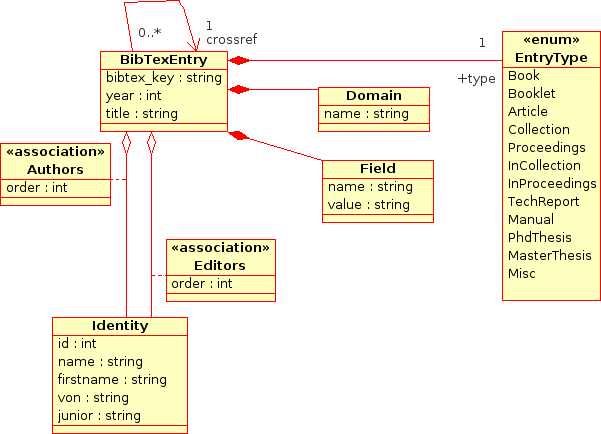
The generator called SQL is the default SQL generator of Bib2ML. Its purpose is to generate a basic content which respects the SQL schema illustrated by the following figure.
- Supported Fields: See the table of fields above.
- Generator Parameters:
sql-encoding=name: Defines the character encoding used to generate the SQL script.sql-engine=name: Defines the SQL engine for which the SQL script should be generated. The supported engines are: "mysql" and "pgsql".stdout: If presents, this option force Bib2ML to output the files onto the standard output instead of files.
6. Supported Themes
Bib2ML permits to select a theme which influence the look of the generated pages. You could select a theme which the command-line option --theme and list all the supported themes which --themelist.
6.1. Theme Simple
The theme Simple is the default theme. It is quiet similar to the default output of JavaDoc.
6.2. Theme Dyna<
The theme Dyna is an experimental theme. It uses its own look policy and includes some dynamical features such a collapsing lists.
7. Supported Languages
Bib2ML supports the French, the English, Spanish (thanks to Sebastian), Portuguese (thanks to João) and Italian (thanks to Cristian).
8. Contributors
I would like to thank the following people for generously taking the time to point out bugs, suggest improvements, or send me Bib2ML patches. Many thanks to:
- João LOURENCO has:
- submited the Portuguese translations.
- Dimitris MICHAIL has:
- added TeX commands.
- Norbert PREINING has:
- added the function
uniqto eliminate redundant values from a sorted list. - added the TeX's commands
\#and\L. - added a warning message inside
__texcommand_map_towhen a accentuated TeX command was encoutered but Bib2ML does not known any corresponding HTML character (e.g.\'b). - fixed a bug inside
__texcommand_map_towhich does not return the right variable's value. - fixed two bugs inside
save_generator_parameterwhich prevent to properly set the parameters' values.
- added the function
- Sebastian RODRIGUEZ has:
- reported bugs and submited the Spanish translations.
- Martin P.J. ZINSER has:
- fixed a bug inside the function
addentrywhich permits to add an BibTeX's field. All the fields' names are lower-cased to avoid setting problems.
- fixed a bug inside the function
- Cristian RIGAMONTI has:
- submited the Italian translations.
- Luca PAOLINI has:
- submited a patch that permits to support more letters with the caron accent.
- Aurel GABRIS has:
- submited a patch that add the generator parameters
max-titlelength-overviewandshow-journalparams-overview.
- submited a patch that add the generator parameters
- Tobias LOEW has:
- patched the TeX parser to support some roman characters.
- Gasper JAKLIC has:
- patched the TeX parser to support some locale characters;
- reproduced high priority bugs and mismatches.
- Olivier HUGUES has:
- reported bugs in bib2sql tool.
9. Disclamer
I've come across mention of other bib2html programs (see below for a non-exaustive list). This program is in no way related to any of them. For the curious, it was implemented using Perl. Other BibTeX to HTML tools are (non-exhautive list):